# iOS 27: Native EQ Settings on AirPods
Apple continues to tighten the bond between iOS devices and Apple AirPods by adding new features that make it easier for you to control your music listening experience. One of the newest additions is native EQ settings on AirPods.
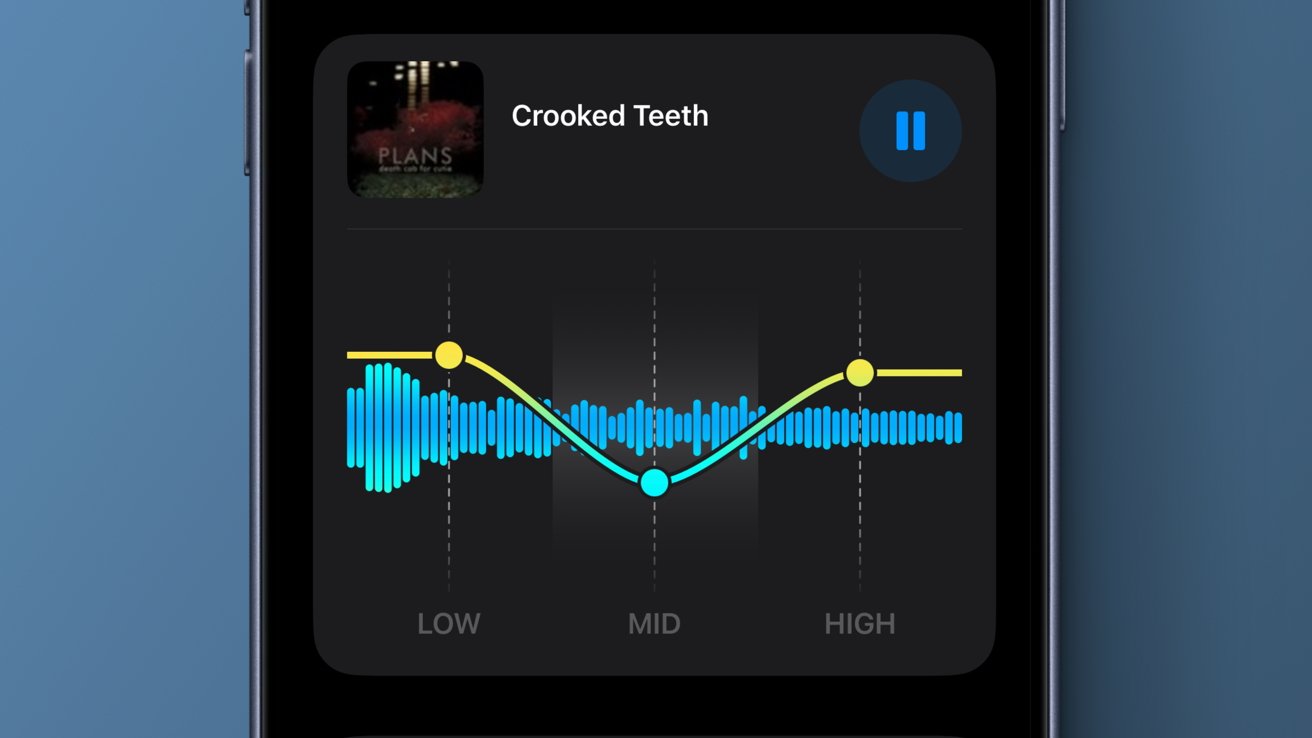
This feature is available in iOS 27, bringing a refreshed experience for Apple AirPods users. The EQ settings let you manually adjust levels for lows, mids, and highs. In other words, you can tailor the sound coming from your AirPods to your own preferences.
This EQ setting has been talked about for a while, but it’s only now appearing on Apple’s latest platform. Previously, Apple only offered a more basic EQ — a simple one that couldn’t be manually customized.
EQ Settings on AirPods: How to Use
To access EQ settings on your AirPods, follow these steps:
1. Open AirPods Settings.
Open the Settings app on your iOS device. Then, look for the menu for AirPods settings.
2. Choose EQ Settings.
Once you reach the AirPods settings menu, note that there are several submenus there. Find the menu for EQ settings and tap its link.
3. Adjust the EQ Settings.
In the EQ settings menu, you can manually set the levels for lows, mids, and highs. Choose the values that meet your needs and preferences.
Where the EQ Settings Apply on AirPods
Keep in mind that the EQ settings feature is only available for AirPods Max 2, AirPods Pro 3, and AirPods 4. That means users with older AirPods won’t be able to use this latest feature.
So, be aware that the features above are already included in iOS 27. You can download the update now to take advantage of the recently refreshed features. Don’t hesitate to try the new functionality so your music listening becomes more engaging and memorable.
#
Category
Updates
Share